If you stick strictly to the subway in Seoul, you are only seeing half the city. As a local living here, I often tell my friends visiting from abroad: “The subway moves you, but the bus connects you.” However, I also know that for a first-timer, the Korean bus system can look like a colorful maze of confusion. And when you just want to get home comfortably, hailing a taxi on the street can be daunting due to the language barrier.
This guide is your “Travel Essential” playbook. I will break down exactly how to master Seoul’s buses using local map apps and how to summon a taxi without speaking a word of Korean using Kakao T.
For general information on Korea’s transportation system, please refer to ‘How to Use Public Transport in Korea.‘ For detailed instructions on using the subway, see ‘Mastering Seoul Subway: Tickets, Transfers, and T-Money‘.
- The Golden Rule: Download These Apps First
- Mastering the Bus: Colors, Numbers, and Etiquette
- The Taxi Revolution: How to Use Kakao T
- Common Mistakes to Avoid (Read This!)
The Golden Rule: Download These Apps First
Here is the harsh truth: Google Maps is unreliable for public transport in Korea. It often lacks real-time data and walking directions. To navigate the bus system without anxiety, you must use one of the two local giants. Both now offer excellent English support.
1. Naver Map or KakaoMap
These apps are not just maps; they are your navigation co-pilots. Here is how to use them to defeat “bus anxiety”:
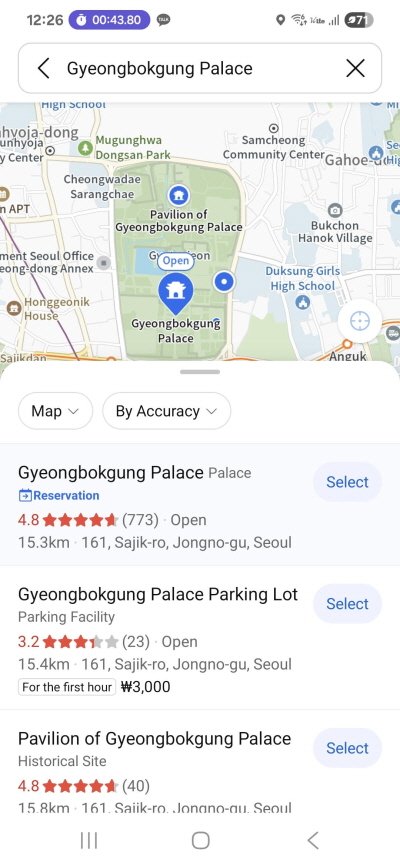
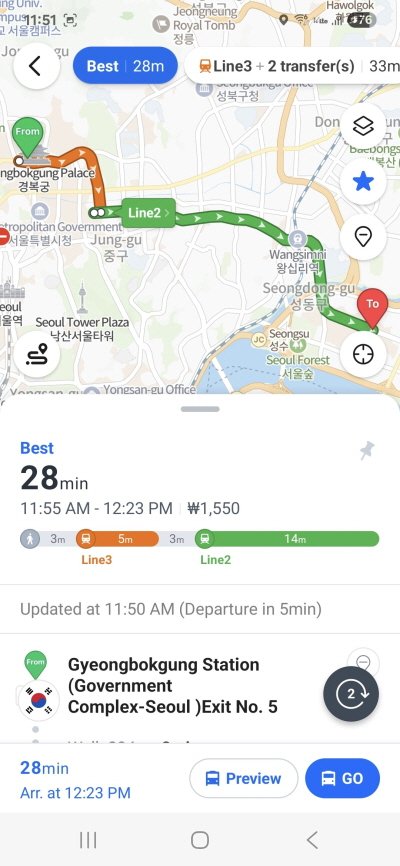
- Search in English: Input your destination (e.g., “Gyeongbokgung Palace”), You can also manually set your pick-up or drop-off location by moving the map with your finger. If you are departing from your current location, simply search for and set your destination..
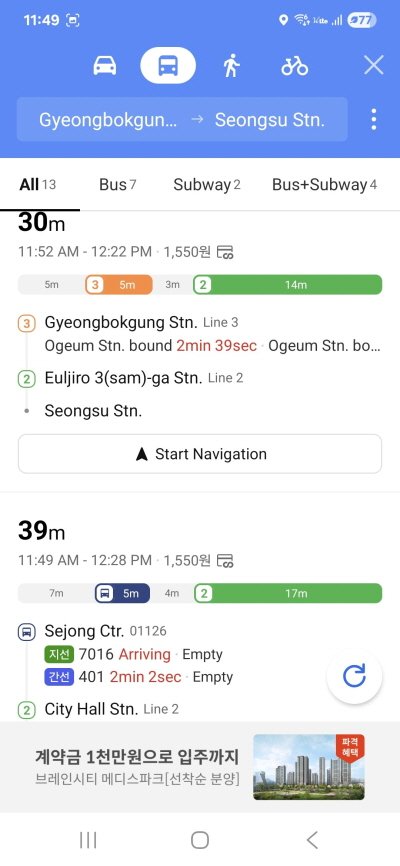
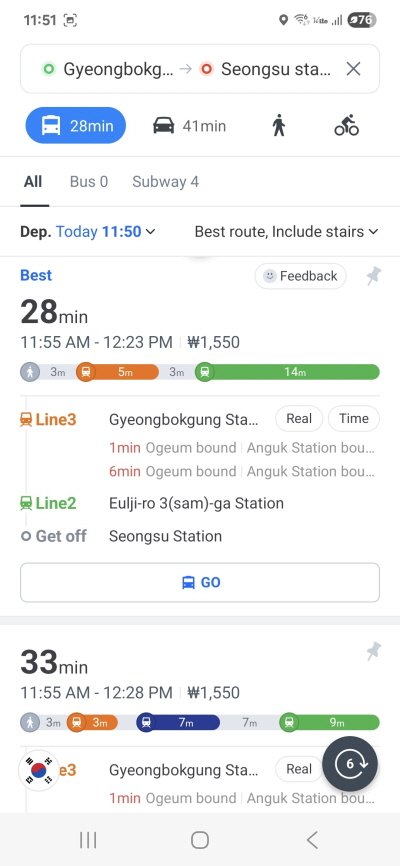
- Select ‘Transit’: Look for the bus icon. The app will provide the Fastest Route.
- The Magic Details: The app will tell you the exact Bus Number, the Bus Stop ID (to ensure you are on the right side of the road), and exactly when the bus is arriving (e.g., “3 min remaining”).
- Real-time Tracking: You can watch the bus icon move on the map as you ride, so you know exactly when to push the stop button.
Mastering the Bus: Colors, Numbers, and Etiquette
Once your app tells you which bus to catch, you need to identify it. Seoul buses are color-coded by function.
1. Decoding the Colors
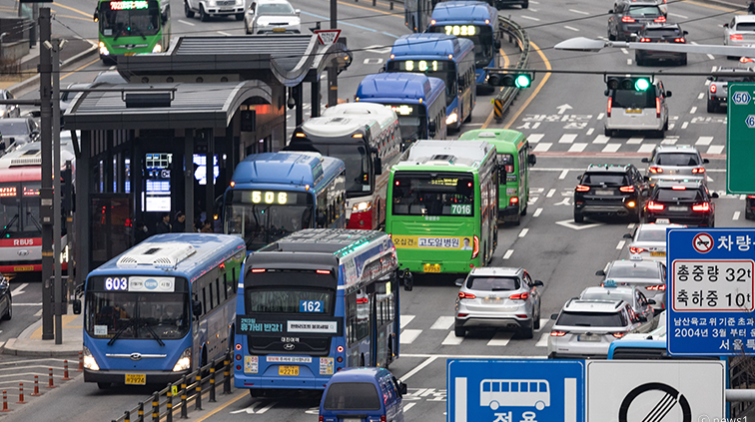
- Blue Bus (Blue): Long-distance runners. They cross the city from one end to the other on major roads.
- Green Bus (Green): The connectors. They link subway stations to residential neighborhoods.
- Village Bus (Maeul – Smaller Green): These small buses go into narrow alleys and up steep hills where the subway can’t reach.
- Red Bus (Gwangyeok): Express commuters that travel between Seoul and satellite cities (like Suwon or Bundang). Note: Standing is prohibited on these highway buses.
2. The “Double Tap” Rule (CRITICAL)
This is where most tourists make mistakes. Korea uses a distance-based integrated fare system.
⚠️ The Rule: Tap On AND Tap Off.
You must scan your T-Money card on the reader when you board (Front Door) AND when you exit (Back Door).
Why? If you forget to tap off, the system doesn’t know where you got off. You will be charged a penalty fare (the maximum possible distance) on your next ride, and you will lose your free transfer discount to the subway or another bus.
3. Boarding and Exiting
- Check the Number: Ensure the bus number matches your app exactly.
- Hail It: If you are at a quiet stop, step forward or wave slightly so the driver knows to stop.
- Board at the Front: Always enter through the front. “Beep” your card.
- Exit at the Back: Press the red “STOP” button before your stop. Walk to the back door, “Beep” your card again, and exit.
The Taxi Revolution: How to Use Kakao T
Sometimes, you have too much luggage, or you are just too tired. In the past, foreigners struggled to hail cabs. Today, Kakao T is the essential travel app that removes the language barrier entirely.
1. Which App Should You Use?
Foreign travelers now have two main options:
- Option A: Kakao T (The Standard): The app locals use. A recent update allows sign-ups with overseas phone numbers and foreign credit cards. Highly recommended for the full experience (taxis, bikes, etc.).
- Option B: k.ride (For Tourists): A dedicated app by Kakao Mobility for foreigners. You can log in with a Google/Apple ID without a Korean number. It is streamlined for simple taxi hailing.
2. Step-by-Step: Using Kakao T
Assuming you use the standard Kakao T app (Option A), here is the workflow:
Step 1: Setup
- Download ‘Kakao T’. Log in with your Kakao account or email.
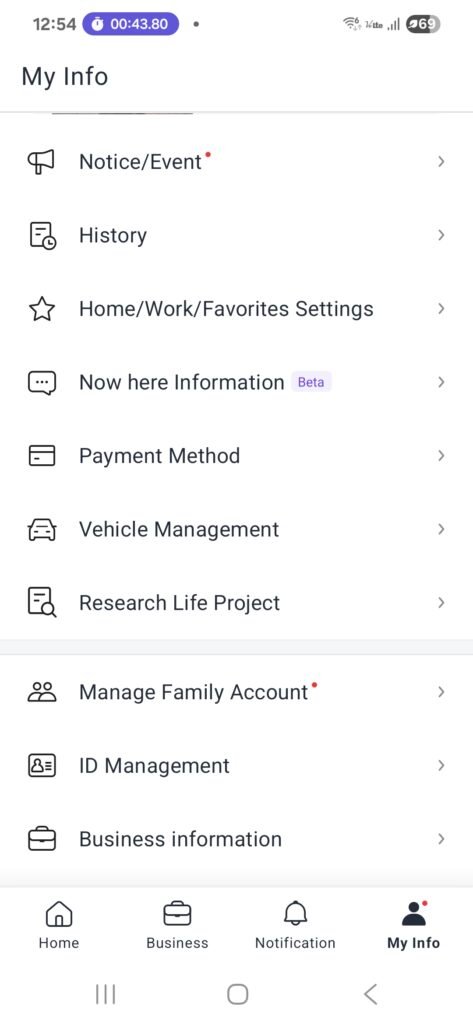
- Go to Menu (my info)> Payment Method > Credit/Debit Card and register your overseas card (Visa/Mastercard). This enables automatic payment, so you don’t need to argue about fares with the driver.
Step 2: Set Destination
- Select the ‘Taxi’ icon.
- Enter your destination in English (e.g., “Grand Hyatt Seoul”).
- Crucial: Check the “Current Location” pin on the map. GPS can drift, so ensure the pin is exactly where you are standing.
Step 3: Choose Your Ride
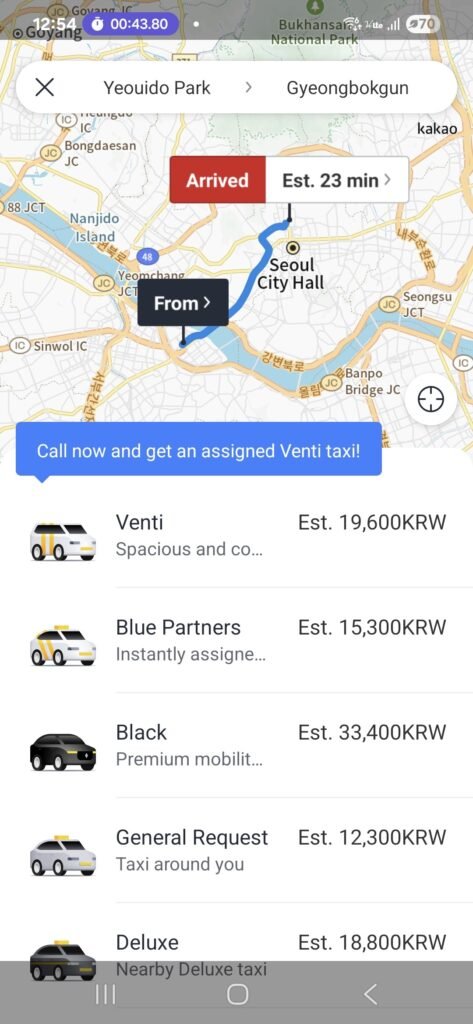
- General Taxi: The standard, most affordable option. Availability varies by traffic.
- Blue Taxi: Costs a small extra fee, but guarantees immediate dispatch and high-rated drivers (no ride refusal). Recommended if you are in a rush.
- Venti: A large van. Perfect for groups (5+ people) or lots of luggage.
- Black: Premium luxury sedan with top-tier service. The most expensive option.
Step 4: Ride
- Press “Request.” The app will show the car’s license plate and the driver’s photo.
- When the car arrives, verify the plate number.
- Hop in. You don’t need to speak Korean because the destination is already on the driver’s GPS. Just say “Hello!”
3. Troubleshooting
If your card registration fails (which happens occasionally with some foreign banks), change the payment method to “Pay to Driver”. You can then pay the driver directly with cash or your physical credit card at the end of the ride. Note: This is usually only available for “General Taxi” calls.
Common Mistakes to Avoid (Read This!)
To wrap up, here are the small things that can cause big headaches. Watch out for these:
- No Food/Drinks on Buses: It is illegal to board a bus with an open drink (like a takeout coffee cup). Drivers will refuse you. Bottled water with a cap is fine.
- The “Palli-Palli” Start: Korean buses start moving immediately after the door closes. Do not look for your wallet while walking to your seat. Have your card ready before you board, and grab a handle the moment you step on.
- Transfer Window: You have 30 minutes (up to 1 hour at night) to transfer between a bus and subway for free. This only works if you tapped off correctly!
- Taxi Scams? Not with the App: Using Kakao T prevents the rare “scam” of drivers taking the long way, as the route is tracked on your phone.
Korean Culture portal KCulture.com
Join the mailing service and add to your favorites.

Founder of Kculture.com and MA in Political Science. He shares deep academic and local insights to provide an authentic perspective on Korean history and society.